Lightcourt / Inside the build
How Today remembers where a reply belongs
A proposal in Studio and a meeting in Northstar compete for the same morning. Follow the 12-minute review into a shared plan and its reply back to the right account.
On this page
System trace
Follow Jordan’s proposal from Studio to Today
Studio Space
Jordan’s proposal review is a Studio item. Its source reference points back to the message and connection that supplied it.
- Receive the request · Studio Space
Jordan’s proposal review is a Studio item. Its source reference points back to the message and connection that supplied it. Studio · proposal review · source message
- Plan the time · Client-side composer
The plan uses Studio’s priority and time estimate alongside busy intervals from other Spaces. It returns an ordered list of references. Due today · 12 estimated minutes
- Show the card · Personal Today view
The client resolves the ordered reference against Studio’s items. The resulting card shows Jordan’s request and opens its Studio detail view. Studio reference + item reference
- Save the draft · Studio action runtime
Approving the proposed local draft saves its text in Studio. Sending a Gmail reply is a separate operation with its own account grant and approval. Local draft · Studio retains ownership
The twelve-minute decision
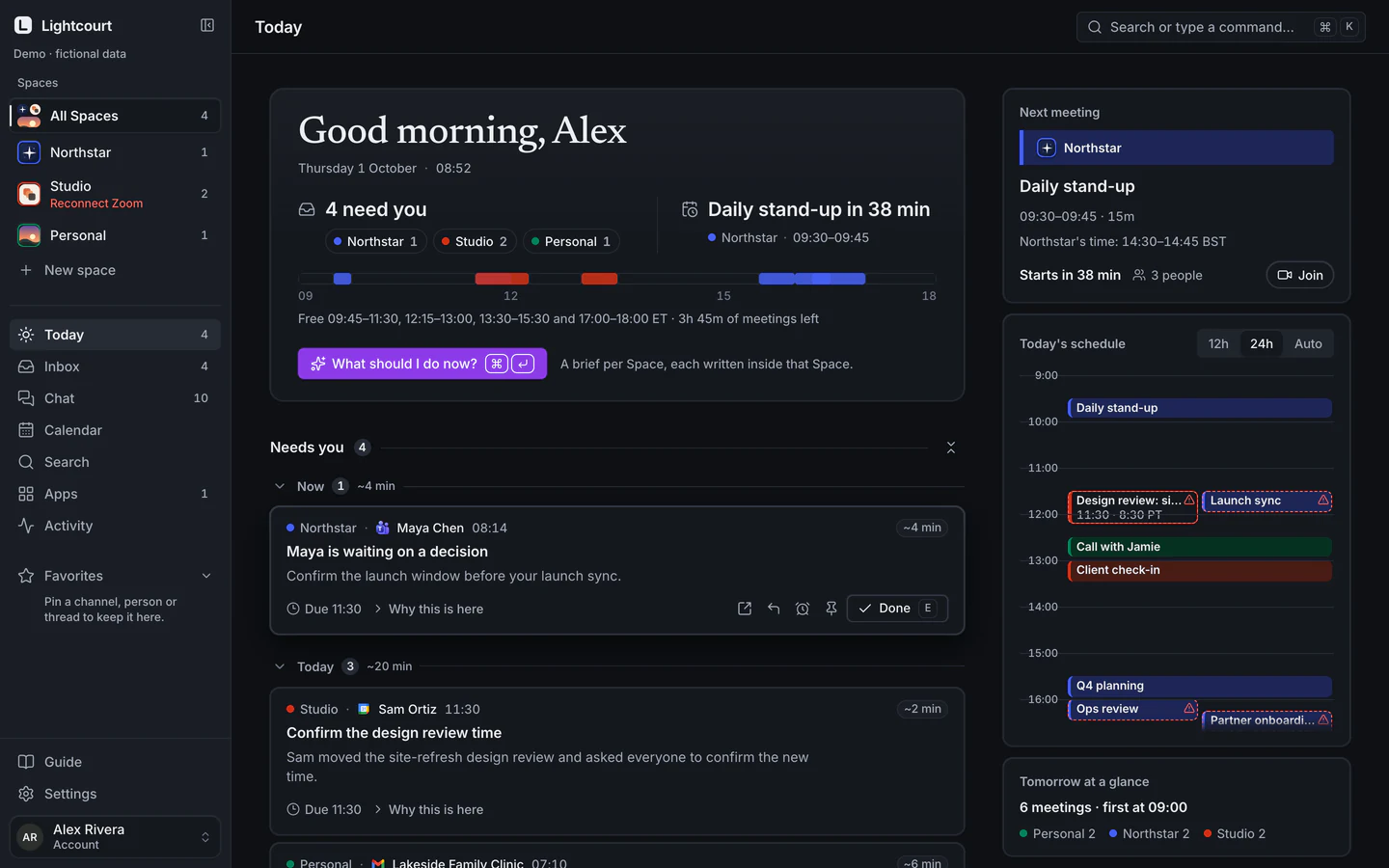
Jordan has finished commenting on a proposal. Alex needs twelve minutes to review it before the end of the day. The request lives in the Studio Space, while a meeting in the Northstar Space limits how long Alex can spend on it. Both pieces of information belong on Alex’s Today screen. Only Studio has a reason to handle Jordan’s message.
I built Lightcourt so those decisions can happen in different places. A small set of scheduling facts can travel to Alex’s device for planning. The original request, its source account and any draft reply keep their Studio ownership throughout. The proposal and its twelve-minute estimate come from the fictional data behind the public demo. Explore Lightcourt’s demo
What a Space owns
A Space is called a Vault in the implementation. The API opens a runtime and a SQLite database for that Space. The runtime maintains its connectors, source records, decisions, policies and drafts. A connection records the provider, the identified account, its granted access and, where applicable, the bound organization. A decision keeps provenance linking it to its connection and source.
This matters when someone has two accounts with the same provider. The Gmail logo can tell Alex what kind of message this is. Sending requires the specific connection that owns the thread. If an existing connection later requests additional permission, the consent flow checks that the returning identity still matches that connection before replacing its grant.
Architecture diagram
One agenda, separate owners
Two Spaces can contribute to the same plan. The browser joins their scheduling facts. Opening a card takes the item back to the Space that can act on it.
Plan the day. Studio contributes a reference, priority and time estimate. Northstar contributes busy intervals. The client orders references and looks up each title in its own Space’s display records.
Approve a reply. A Studio card opens a Studio item. Saving a draft records a local decision. A provider send is a separate approved action bound to that item’s source thread and account connection.
The contract behind the plan
The user’s client asks each available Space for a scheduling summary using access scoped to that Space. An item’s display policy determines whether it can contribute to the combined plan. For eligible items, a projection selects a fixed set of fields. The composer can work out whether something fits using these records.
| Record | What the next component receives | What it can decide |
|---|---|---|
| Space scheduling summary | Space and item references, priority class, estimated minutes, optional start and end of a busy interval | How urgently an item needs time and what time is already occupied |
| Ordered plan step | A Space reference, item reference and allocated minutes | Which Space should supply the card and where to place it |
| Display record for one Space | Item title, summary and references back to that Space’s sources | What Alex should see and which item to open |
| Local draft proposal | The owning Space, decision item, proposed action and draft text | What Alex is being asked to approve |
The composer orders items by priority, breaks ties by estimated duration and tries to fit eligible work before the next busy interval. The fixture gives Alex 38 minutes. Four tasks fit into 24, including the twelve-minute Studio review. Calculating that fit requires neither Jordan’s email nor the name of the Northstar meeting. The estimate is an input to a suggested plan. Alex still decides how long to spend.
How the title reaches the card
The small scheduling record raises a practical question. How can the card say “One last look at the proposal” if the composer never reads the title?
The personal client also reads display details separately from each Space. After the composer returns its ordering, the ledger takes each pair of references, looks in the named Space’s item collection and checks that the returned item belongs there. The Today view also keys the message lookup by Space when it attaches the source. Opening the card carries both the Space and the item into the detail view.
If Studio’s details have yet to load, the ledger skips that row. Alex may temporarily see an incomplete agenda. Filling the gap from another Space because a title looks familiar would assign the wrong owner. The browser is the component that can see several Spaces’ display text together, so the session and the device it runs on are part of the trust boundary. Lightcourt’s security overview
Approving a draft and sending a reply
Opening Jordan’s card can display a proposed local reply. The item view asks Studio for that item’s proposal. Approval goes to Studio’s action handler, which checks the stored proposal and records the draft in Studio. At that point Alex can put the laptop away. Jordan’s inbox has received nothing.
A provider reply is a separate choice. With the relevant permissions enabled, the runtime binds the operation to a connection and stored source thread. It derives the recipients for a reply from that source, presents the proposed content for approval and checks the connection’s grant. The provider adapter submits the approved operation, then uses a read-back check to establish the result.
One awkward case is a provider accepting a message and returning an error before Lightcourt learns the outcome. Sending it again could put two identical replies in Jordan’s inbox. The Gmail path checks for evidence of the first delivery. When it cannot establish what happened, it reports an unknown delivery outcome so Alex can check the provider before trying again.
What I checked and what I would test next
I ran seven targeted checks against the implementation. Two Today tests checked that each card belongs to one Space and each Space’s scheduling summary uses its own access. Two ledger tests exercised the 38-minute plan and a missing Space’s display records. Three Gmail tests used a mock provider to check the thread and recipients for a reply, saving a provider draft, and recovery from an ambiguous send. Actual mailbox delivery and consent on a customer account still require a live provider test.
My next check would give Studio and Personal the same email subject, “Proposal review,” and delay the Studio detail response while Alex switches Spaces. When Studio’s card appears and Alex opens it, the detail view, draft owner and reply preview should all identify Studio. That test follows what a reader can see and what the backend will do at the moment the two are easiest to confuse.
Review notes
Corey Crooks built Lightcourt. This walkthrough draws on the product and its implementation.
- Inspected the Space runtime, connector binding, attention projection, client composer, Today cards, local drafts and provider action implementation.
- Ran seven targeted checks covering Today, its fixture plan, missing display data and the Gmail reply, draft and ambiguous-delivery paths. Provider tests used a mock.
Live Gmail delivery and provider approval for an individual account were outside these checks.